Send Confidential Documents by Email: A Safe PDF Routine
To send confidential documents by email, remove anything the recipient does not need, encrypt the PDF with a strong password using AES-256, attach it, and send the password through a different channel such as a text message or phone call. Email alone is not a safe container, but a locked PDF protects the contents wherever the message ends up.
🔒 Try Protect PDF now — freeOpen →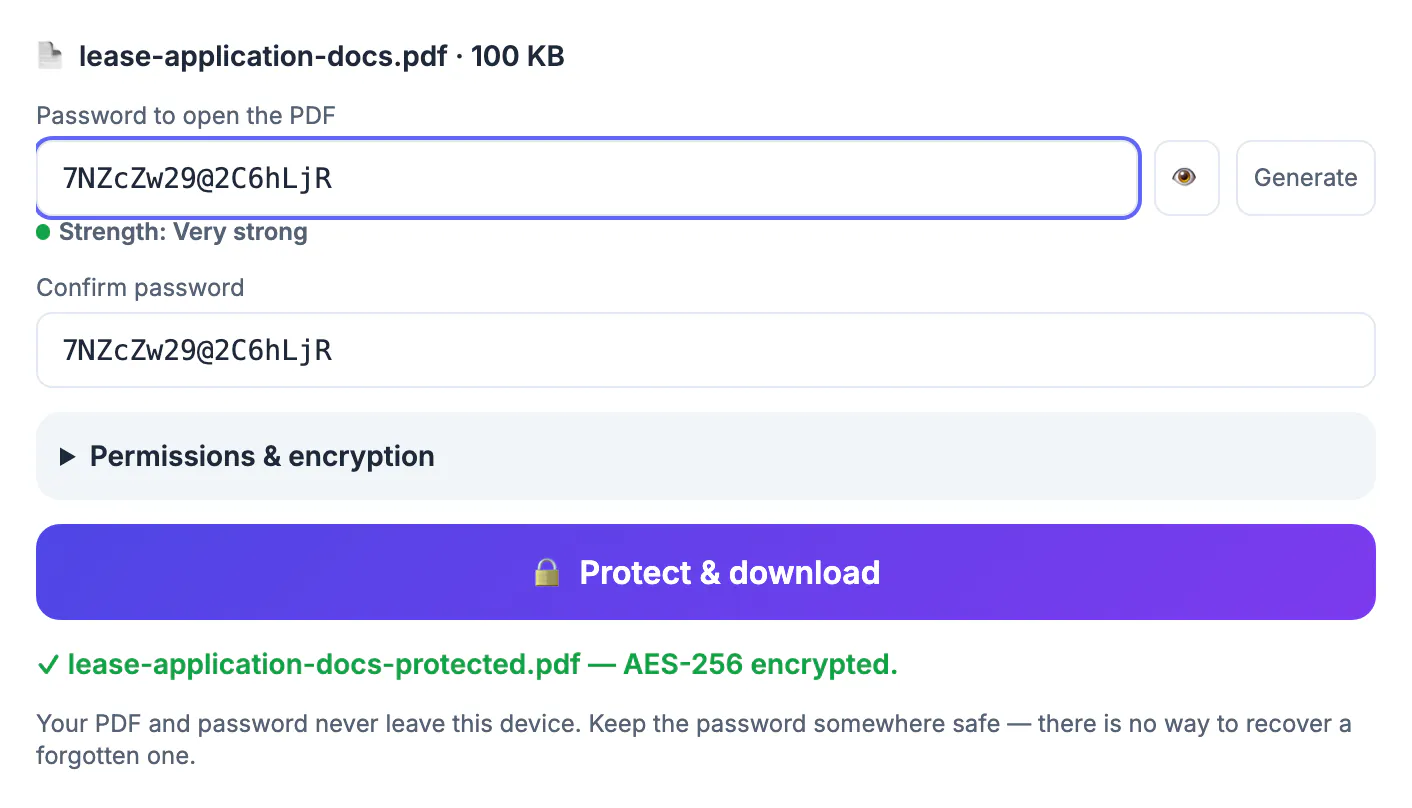
Emails are often encrypted in transit, but they are stored readable in at least two mailboxes, forwarded, synced to phones and archived for years. A mistyped address sends a payslip to a stranger in a second. Accountants, HR teams, landlords and solicitors need email’s convenience without that tail; encrypting the file means a leaked message exposes only a locked file.
Redact and trim before you send confidential documents
The safest data is data you never send. Cut the file down first.
- Remove unneeded pages; a broker asking for one statement does not need twelve.
- Black out account numbers, dates of birth or ID numbers that are not required, with a tool that removes the text, not one that just draws a box on top.
- Check hidden content: comments, exported tracked changes and author properties.
- Merge related pages into one file, so there is one password to share instead of five.
GrabCast’s Redact PDF and Merge PDF both run in the browser, so this preparation does not involve uploading the file anywhere.
Encrypt the PDF with a password and permissions
GrabCast Protect PDF encrypts the file with AES-256 using qpdf, an open-source engine running in your browser. The file and password never leave your device.
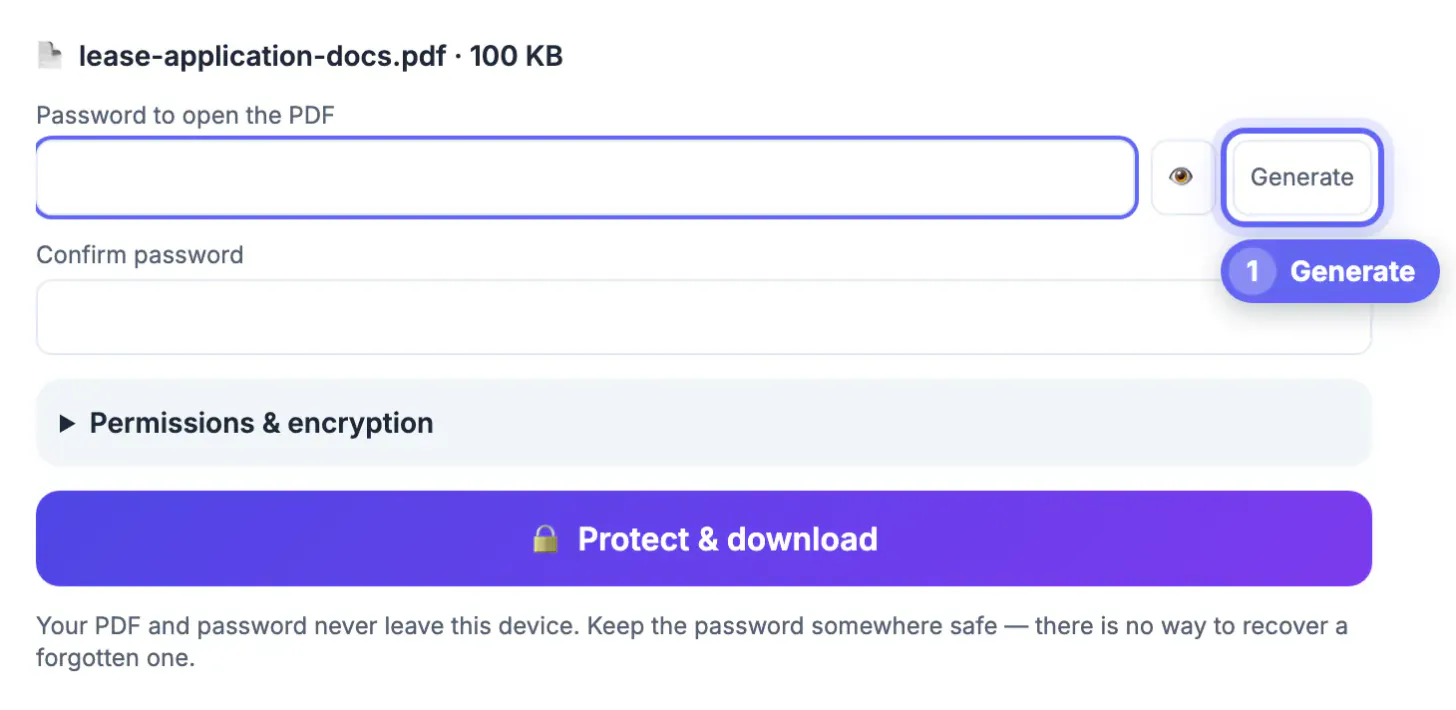
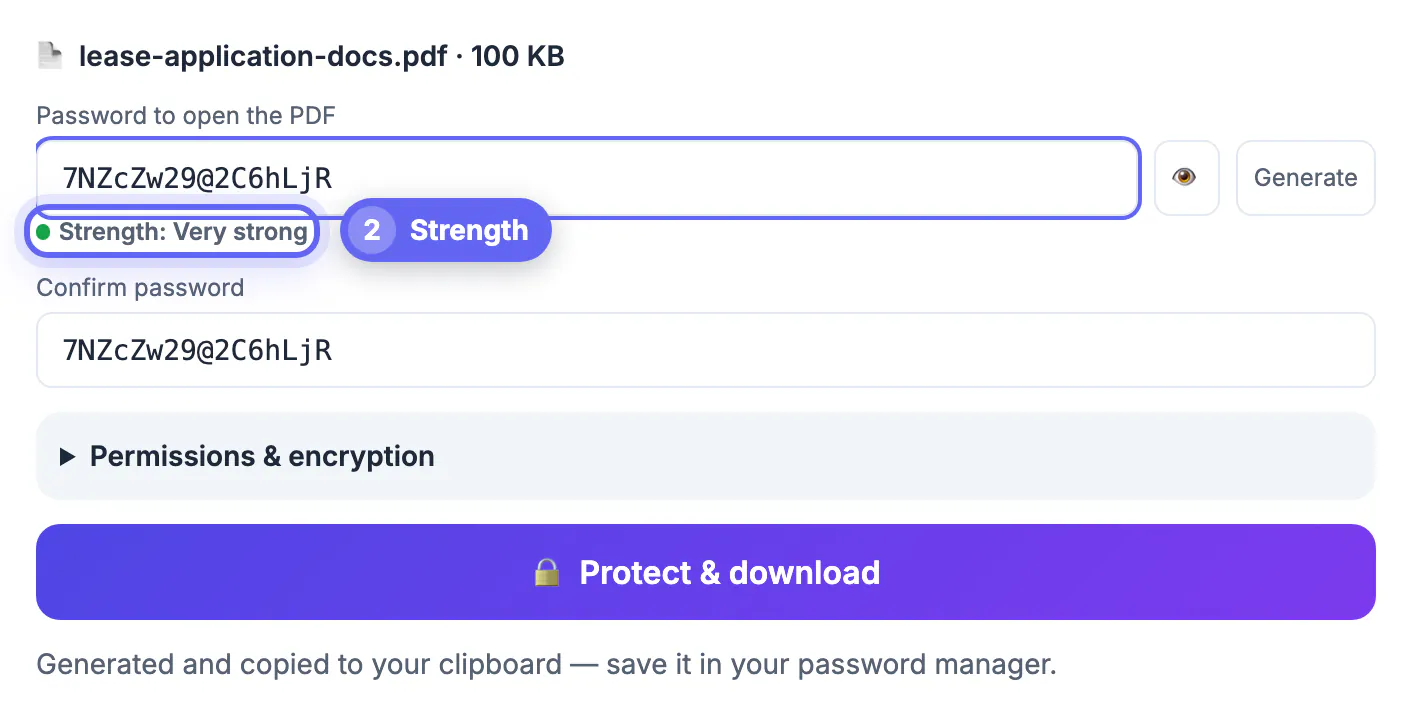
- Press Generate for a random 16-character password; it is copied to your clipboard so you can paste it into a password manager.
- The strength meter flags weak choices. The tool accepts as few as 4 characters, but for anything confidential use 12 or more.
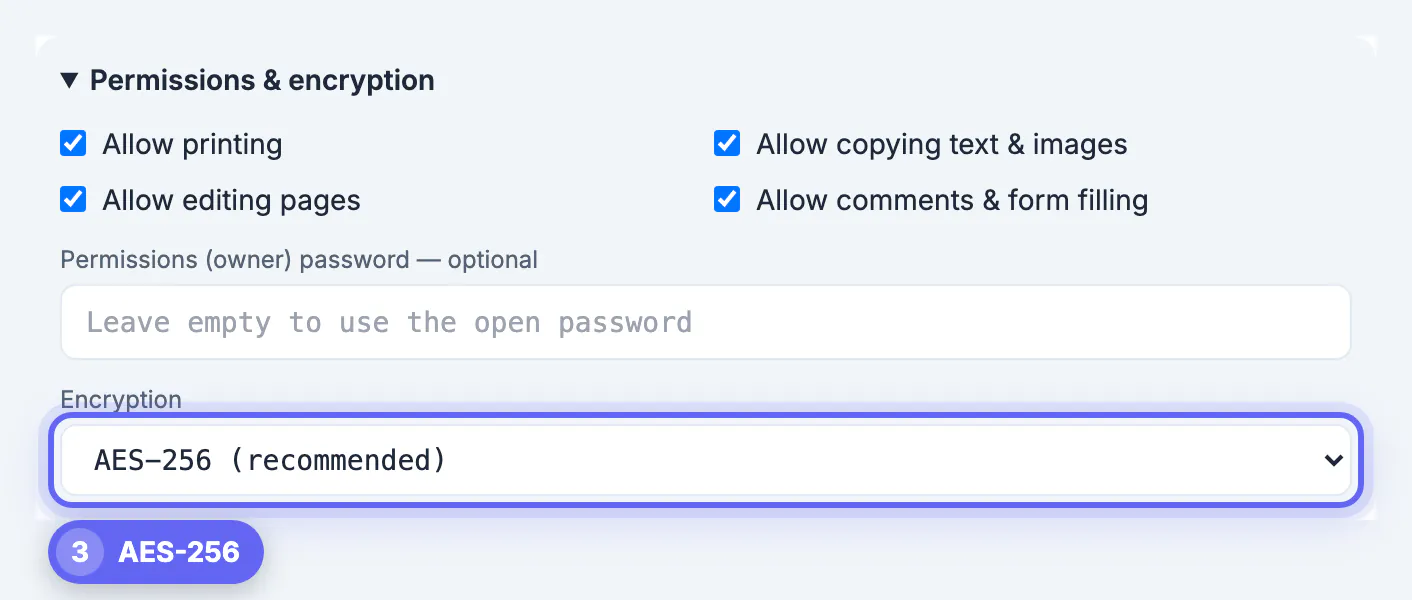
- Under Permissions you can block printing, copying or editing. Readers are asked to honour these; the open password is what actually protects the content.
- Restrictions set without an owner password are locked with a random one you never see, so keep the original.
- AES-128 exists only for very old readers; leave AES-256 selected unless a recipient cannot open the file.
The output is saved as yourfile-protected.pdf. There is no way to recover a forgotten password.
Share the password and name the file safely
Encryption fails if the password travels with the file. Anyone who can read the email can then read the document.
- Send the password by text message, a phone call, a messaging app or a password manager share, never in the same email or thread.
- Agree the channel in advance with regular contacts.
- Keep the subject line neutral: “Documents you requested” rather than “Passport and bank details for John Smith”.
- Name the file for its purpose, such as lease-application-docs.pdf, not smith-ssn-and-statements.pdf; file names are visible without the password.
- Double-check the recipient; auto-complete misdirects email.
When a secure portal beats email
A protected PDF by email suits one-off exchanges of moderate size. Some situations call for something more controlled.
- Large files: many email providers cap attachments at around 20 to 25 MB at the time of writing, and some recipients’ servers accept less.
- Repeated exchanges with the same client, where a shared portal keeps one current copy instead of versions scattered across inboxes.
- When you need to revoke access, set an expiry date or see who opened the file.
- Regulated work such as health records or client money, where your professional body or employer may require an approved system.
- Recipients who struggle with passwords.
If your mail system offers built-in encryption, follow your policy on using it alongside or instead of a locked PDF.
Choosing a strong password and sharing method
A good password for a document is long and random, not a word with a number. Sixteen random characters or a passphrase of five or six unrelated words resist guessing. Generate one with the Password Generator and paste it into the protection tool rather than typing it, which prevents typos that lock the recipient out.
- Send the password through a different channel from the file.
- Tell the recipient the file name so they know what it unlocks.
- Do not reuse the password for other documents.
- Delete the message containing the password after the recipient confirms access.
If a recipient cannot open the file later, unlocking a PDF when you know the password explains how to create an unprotected copy for authorised use.
Check the file before you attach it
Before sending, open the final PDF and check that redactions are permanent, the metadata does not reveal internal names, and the file opens with the password. Check the recipient address twice, especially with autocomplete, and use a neutral subject that does not describe the contents.
Step-by-step
Common mistakes to avoid
Pro tips
Frequently asked questions
Is it safe to send confidential documents by email?
It is much safer when the attachment is an AES-256 encrypted PDF with a strong password shared through a different channel. An unencrypted attachment is readable by anyone who reaches the mailbox.
Can the recipient open a password-protected PDF on a phone?
Yes. Modern PDF readers on iPhone and Android, and the built-in viewers in Chrome and Edge, open AES-256 files after the password is entered.
Is my file uploaded when I protect it with GrabCast?
No. Encryption runs in your browser with qpdf compiled to WebAssembly, and neither the file nor the password is sent to a server.
Does encryption hide the file name?
No. File names, email subjects and sender details stay visible, so keep them neutral.
What if the recipient forgets the password?
Send it again through the same separate channel. If you lose it yourself, it cannot be recovered, so keep the unprotected original safe.
Send confidential documents by email in four moves: cut the file down, encrypt it with AES-256 and a generated password, send it with a neutral name, and deliver the password another way. For large, repeated or regulated exchanges, use a secure portal instead.
Related guides
Browse more: all PDF guides · Protect PDF